Tap Morse Code: Send It With One Finger (and Why Prisoners Used Tap Code Instead)
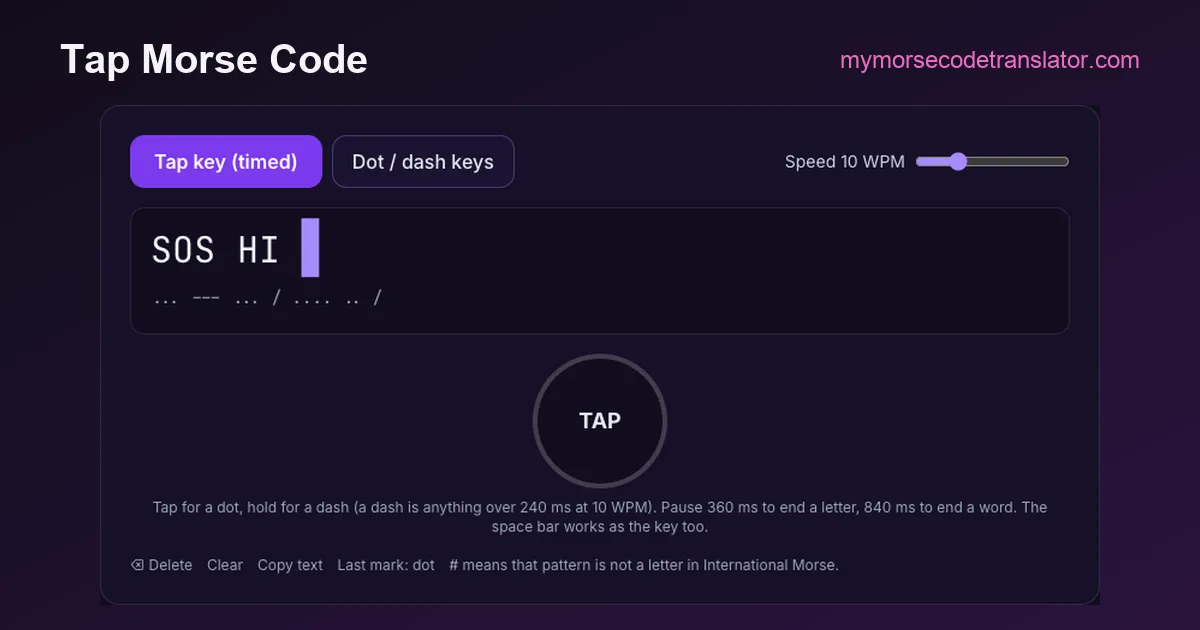
To tap morse code, you use one key and two lengths of press: a quick tap is a dot, a press held about three times as long is a dash. The pauses do the rest, a short pause ending a letter and a longer one ending a word. The key below works exactly like that. Tap it (or hold the space bar) and the letters appear as you send them. Knocking on a wall or a table is different, because a knock has no length, and that difference is why the "tap code" used by prisoners of war isn't Morse at all. Both are explained below.
▌
Tap for a dot, hold for a dash (a dash is anything over 240 ms at 10 WPM). Pause 360 ms to end a letter, 840 ms to end a word. The space bar works as the key too.
Using the tap key above
The key decides dot or dash by how long you hold it, measured against the speed you set. At the default 10 words per minute, one Morse unit is 120 milliseconds, so:
- A press shorter than 240 ms is a dot. Anything quick and crisp lands here.
- A press of 240 ms or longer is a dash. Aim for about 360 ms, three units, and you will be well clear of the boundary.
- A pause of 360 ms after your last mark closes the letter, and the decoded character appears.
- A pause of 840 ms closes the word and adds a space.
Those ratios, 1 for a dot, 3 for a dash, 3 between letters and 7 between words, are the ones defined for International Morse in ITU-R M.1677. The key just applies them to your finger. If letters keep splitting in the middle (you meant ·– and got · then –), you are pausing too long between marks. Lower the speed slider: that lengthens every threshold, so the key waits longer for you.
On a phone, press and hold the round key with your thumb. On a laptop, the space bar is easier, because it gives you a real physical click. The key plays a 600 Hz tone while it is held, the classic radio sidetone pitch, so you can hear your rhythm as well as see it. Each letter appears in amber while you are still keying it, and turns white once the pause has closed it. A # means the pattern you sent is not a character in International Morse, which nearly always means a mark too many.
When you finish, Copy text copies the decoded message, and the Morse code decoder or the main Morse code translator will turn it back into audio or a flashing light if you want to send it on.
A five-minute exercise that fixes uneven tapping
Almost everyone who starts sending by hand has the same fault: dashes that are too short. They come out at about twice a dot instead of three times, so a keyer, or a listener, can't tell them apart reliably. Here is how to fix it with the key above:
1. Set the speed to 8 WPM. A unit is then 150 ms, and the dash boundary sits at 300 ms.
2. Send TTTTT, five dashes with letter gaps. Every one should decode as T. If any come out as E, your dash is too short.
3. Send EEEEE. Every one should be E. If any come out as T, you are leaning on the key.
4. Send PARIS, the word the speed standard is built on (·––· ·– ·–· ·· ···). It mixes every kind of mark and gap, so a clean PARIS means your rhythm is right.
5. Raise the speed by 2 WPM and repeat. When PARIS stops decoding cleanly, you have found your current sending speed.
You can check your reading as well as your sending. Play a word in the text to Morse code audio player, then try to tap back exactly the rhythm you heard. When your tapping and the machine's playback sound the same, both skills are improving together, and the Morse code trainer will speed up the listening half.
Tapping Morse on a wall, a desk or someone's hand
Off the screen, the dot/dash problem gets harder. A knock on a door is the same short sound however long your knuckle stays on the wood, so a pure knock can only carry dots. People who tap Morse in the physical world get around that in one of three ways:
- Two different sounds. A fingertip tap for a dot and a knuckle or a flat-hand thump for a dash. This works well on a desk between two people who can see or hear each other clearly.
- Contact length. Pressing and holding, or a short scrape for a dash. This is how tapping on someone's palm or arm works, and it is surprisingly readable.
- Timing only. Sending a dash as two taps close together. It's slow and easy to confuse, so agree on it in advance.
None of these is a standard. International Morse defines sounds and lights by duration, and knocks don't have one. So whatever you choose, agree on it first, and spell slowly with clear gaps between letters. For a short signal that anyone with a little Morse will understand, SOS is still the one to tap: ··· ––– ···, three short, three long, three short. Even if your "long" taps are only distinguishable by a slight pause, the symmetrical pattern stands out. Our SOS Morse code page has the details.
Tap code is not Morse: how the prisoners' code works
The other thing people mean by tapping in code is tap code, a separate system built for exactly the problem above: you can't knock a dash.
Tap code puts the alphabet in a 5×5 grid, with K dropped and C used in its place:
| | 1 | 2 | 3 | 4 | 5 | |---|---|---|---|---|---| | 1 | A | B | C/K | D | E | | 2 | F | G | H | I | J | | 3 | L | M | N | O | P | | 4 | Q | R | S | T | U | | 5 | V | W | X | Y | Z |
Each letter is two groups of taps, the row first, then a pause, then the column. B is one tap, pause, two taps. Only the count matters, never the length, which is why it works on pipes, bars and concrete walls.
According to Wikipedia's tap code article, the grid descends from the ancient Greek Polybius square. A version appears in Arthur Koestler's 1941 novel Darkness at Noon. Its best-known use was by American prisoners of war in Vietnam, where four POWs at Hỏa Lò prison (the "Hanoi Hilton") introduced it in June 1965: Captain Carlyle "Smitty" Harris, Lieutenant Phillip Butler, Lieutenant Robert Peel and Lieutenant Commander Robert Shumaker. Harris had heard of a similar code used in World War II. The same article notes that prisoners chose it over Morse because Morse is harder to send by tapping, and that they shortened common phrases, for example GN for good night and GBU for God bless you.
Jeremiah Denton, one of those POWs, is also famous for the other direction: in a 1966 televised propaganda interview he blinked T-O-R-T-U-R-E in Morse code with his eyes. Blinking, unlike knocking, does have length, so Morse works for it.
Morse vs tap code, measured
Tap code is easier to send on a wall but costs far more taps. Here is the count for the same words, Morse marks against tap-code taps:
| Word | Morse | Marks | Tap code | Taps |
|---|---|---|---|---|
| SOS | ··· ––– ··· | 9 | 4-3 3-4 4-3 | 21 |
| HI | ···· ·· | 6 | 2-3 2-4 | 11 |
| NO | –· ––– | 5 | 3-3 3-4 | 13 |
| YES | –·–– · ··· | 8 | 5-4 1-5 4-3 | 22 |
| HELP | ···· · ·–·· ·––· | 13 | 2-3 1-5 3-1 3-5 | 23 |
| HELLO | ···· · ·–·· ·–·· ––– | 16 | 2-3 1-5 3-1 3-1 3-4 | 26 |
| GN | ––· –· | 5 | 2-2 3-3 | 10 |
On these words, tap code needs roughly two to three times as many taps. In exchange it needs no rhythm at all: anyone who knows the alphabet and the first letters of the rows (A, F, L, Q, V) can work out the whole grid in a minute, which is a big part of why it spread so quickly among prisoners. Morse is faster for anyone who knows it, and it is the only one of the two that also works as sound, light and radio.
So which should you use?
- Tapping on a screen or a key: Morse. Use the key at the top of this page.
- Knocking through a wall with no other signal: tap code.
- Blinking, flashing a torch or beeping: Morse, through the Morse code light translator or the audio translator.
- A message someone else must decode later: written Morse, which the Morse code decoder reads instantly.
Tapping Morse into a phone
If what you want is to type with Morse taps on your phone every day, rather than practise on a page, the tool you need is a Morse keyboard. Gboard on Android has a Morse code layout with separate dot and dash keys and a setting called character timeout, the pause after which it turns your taps into a letter. It is the same idea as the pause threshold on the key above. Setting the timeout to "Never" lets you close each letter yourself.
Our Morse code keyboard page walks through turning it on and compares it with the untimed dot/dash keys built into this site. That untimed mode is useful if you find the timing of a single key stressful: you press dot or dash explicitly, then "Next letter", so speed never matters.
Why hand-sent Morse sounds the way it does
Even with perfect intentions, hand-sent Morse is never machine-perfect, and experienced listeners can often recognise a friend by their "fist", the personal rhythm of their sending. Dashes a little long, letter gaps a little short, a habit of rushing the end of a word: these quirks come from exactly the dot/dash timing the key above measures.
That is also why the key shows your marks as you send them. You can see your fist. If your Ls come out as ·–· followed by a stray · (R then E), your third gap is too long. If your Ps decode as #, you have probably added an extra mark. It's a good mirror, and a few minutes of watching your own sending decode is the fastest way we know to make it clean.
On 22 October 2026 I worked out every tap-code count on this page from the 5×5 grid and checked every Morse pattern against the site's code table. Then I tested the key with the space bar at 10 WPM: 100 ms presses for dots, 380 ms for dashes and about half a second between letters. SOS and HI both decoded cleanly, just as the 240 ms dot/dash boundary predicts.
Frequently Asked Questions
Q. How do you tap Morse code?
Tap briefly for a dot and hold about three times as long for a dash. Leave a short pause (three dot-lengths) between letters and a longer one (seven) between words. The key on this page decodes your taps as you go.
Q. Is tap code the same as Morse code?
No. Tap code uses a 5×5 letter grid, and each letter is sent as two counts of taps (row, then column), with C standing in for K. Morse uses long and short signals. Tap code was designed for knocking, where a long signal is impossible.
Q. What is SOS in tap code?
S is row 4, column 3 and O is row 3, column 4, so SOS is 4-3 3-4 4-3, 21 taps in all. In Morse it is ··· ––– ···, just 9 marks.
Q. Can I tap Morse code on my phone?
Yes. Use the round key on this page, which works with touch, or turn on Gboard's Morse layout to type with dot and dash keys in any app.
Related guides
← Back to the My Morse Code Translator home page.

By Sukie
Sukie is the creator of My Morse Code Translator — a puzzle nerd and gadget tinkerer who fell down the Morse code rabbit hole and decided to build the most fun Morse translator on the web. When she's not adding new sound packs or reveal animations, she's decoding hidden messages in songs or designing Morse code bracelets for friends.
Last updated: 2026-10-31