Morse Code Trainer: Learn the Letters by Ear, One Character at a Time
This morse code trainer plays one character at a time, at full speed, and you type what you heard. You start with two letters, K and M. Once 90% of your last 20 answers are right, it adds the next one. That is the whole method, and it is the one most serious learners end up using. Press Start below, keep your eyes off the chart, and give it ten minutes.
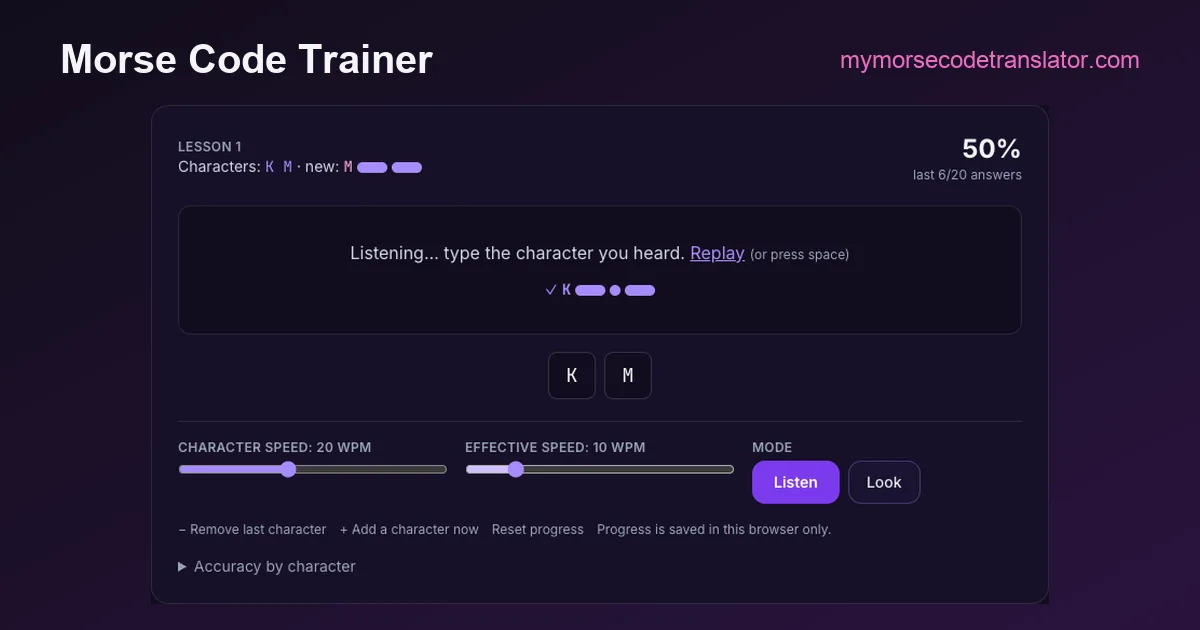
Lesson 1
Characters: K M · new: M
—
last 0/20 answers
How this trainer works, and why it plays so fast
The trainer above is built on the idea the German psychologist Ludwig Koch published in the 1930s: learn every character at the speed you eventually want to copy, and control the difficulty by limiting how many characters you meet, never by slowing them down. Our how to learn Morse code guide explains the reasoning in detail. The short version is that a letter played slowly is a different sound from the same letter played fast. At 5 words per minute, K is three separate beeps you can count. At 20 words per minute it is one rhythm, dah-di-dah, that you either recognise or you don't. Counting is the habit that stalls people at around 10 WPM, so the trainer never gives you time to count.
Here is what each control does:
- Character speed (default 20 WPM) is how fast the dots and dashes inside a letter are played. A dot at 20 WPM lasts 60 milliseconds, and a dash 180. Leave this high.
- Effective speed (default 10 WPM) stretches only the silence between characters. This is Farnsworth spacing: you hear the letter at full speed and then get a breath before the next one. Raise it as you improve, until it meets the character speed.
- Listen / Look. Listen plays the sound and hides the pattern. That is the real training. Look shows the dots and dashes without sound, for when you are on a train with no headphones. It's useful, but it trains your eyes, not your ears, so don't make it your main mode.
- Answer buttons and keyboard. Type the letter on your keyboard or tap its button. Press the space bar to hear the character again.
- The 90% test. The trainer keeps your last 20 answers. Once at least 18 of them are right, it offers the next character. You can also add or remove a character yourself.
The newest character comes up about four times in ten, so it gets the most attention while the older ones keep appearing often enough to stay sharp. Your lesson, speeds and per-letter accuracy are saved in your own browser's local storage. Nothing is sent to us, there is no account, and clearing your browser data resets it.
About the order. The lesson order here is our own: K M R S U A P T L O W I N J E F Y V G Q Z H B C D X, then the digits. It front-loads letters whose rhythms are easy to tell apart and spreads out the look-alikes (E/I/S/H/5, T/M/O). It is not Koch's original 1936 list. Learn CW Online (LCWO), G4FON's trainer and the Long Island CW Club each publish their own orders. The comparison tool at morsecode.world lists them side by side, and all of them work. What matters is adding one character at a time and moving on only when you are accurate.
A ten-minute daily plan that gets you through the alphabet
Short and daily beats long and weekly. Recognising a rhythm is a reflex, and a reflex is built by repetition spread over days, not by one long cram. Our how to learn Morse code guide covers why, and the Long Island CW Club's free classes are organised the same way: regular short sessions rather than marathons. Ten focused minutes, once or twice a day, is the target.
A plan that fits around a normal day:
- Days 1–2: K and M only. It feels too easy. Stay there anyway until the 90% bar appears without effort, because these two sessions are teaching you to answer without picturing dots and dashes.
- Days 3–10: one new character per session at most, often one every second session. When a new letter comes in, your accuracy will drop to about 70%. That is normal, not a failure. Keep going until it climbs back over 90.
- Around lesson 15: most people hit their first wall, usually because two similar letters have arrived (U and V, or the S–H family). Open "Accuracy by character" under the trainer. Any letter shown in amber is the one dragging you down, so run a session or two where you deliberately listen for it.
- After the alphabet: the digits come last because they are long and regular (every digit has exactly five marks), which makes them easier than they look.
Two habits make a big difference. First, answer immediately. If you didn't know it, guess or skip; a guess that comes from the sound teaches more than a correct answer worked out from a mental chart. Second, say the rhythm, not the dots: dah-di-dah, not "dash dot dash". The spoken rhythm is much closer to what you will actually hear.
If you want to practise with real words between trainer sessions, paste a sentence into the text to Morse code audio player at the same speed and try to copy it. Or open the Morse code alphabet page after a session to check a letter you keep missing. After, not before: looking at the chart first is the habit this trainer is designed to replace.
What to do with a wrong answer. When you miss one, the trainer shows the character you typed and the right one, with both patterns drawn to scale, and pauses a little longer before the next one. Use that second. Don't study the dots; replay the sound in your head and notice what made it different. Most misses fall into three families: dot-heavy letters that differ by one dot (S, H and 5), letters that are mirror images (A and N, D and U, G and W), and letters with one mark added at the end (A and W, N and K). Once you know which family you confuse, you can listen for that one difference, and the error usually disappears within a session or two.
Choosing speeds: what the numbers mean in milliseconds
Words per minute in Morse is defined by the standard word PARIS. Including the gap after the word, PARIS is 50 dot-lengths long, so at W words per minute one dot lasts 1.2 ÷ W seconds. That rule comes straight from the timing in ITU-R M.1677: a dash is three dots, the gap inside a letter is one dot, the gap between letters three, the gap between words seven. Our Morse code timing page works through it. Here is what that means for the speeds on the slider:
- 10 WPM: dot 120 ms, dash 360 ms. Slow enough to count, which is exactly why we don't recommend it as a character speed.
- 15 WPM: dot 80 ms, dash 240 ms. A common middle ground if 20 feels like too much on day one.
- 20 WPM: dot 60 ms, dash 180 ms. The trainer's default, and the speed at which letters stop being countable for most people.
- 25 WPM: dot 48 ms, dash 144 ms. For a second pass once you know the alphabet.
The effective speed slider can't go above the character speed. If you set it higher, the trainer simply plays with no extra spacing. A good progression is to keep the character speed at 20 and nudge the effective speed up by 2 WPM each time you finish a handful of lessons comfortably. Once the two numbers meet, you are copying at true 20 WPM with standard spacing, and that is a speed at which you can follow a lot of real on-air Morse.
The tone is fixed at 600 Hz, a comfortable pitch on phone speakers and earbuds alike. If you prefer a different pitch, the main Morse code translator lets you change frequency and sound for anything you paste in.
What a browser trainer can't do (and where to go next)
This trainer teaches one skill, recognising single characters by ear, and it is honest about the edges of that.
It doesn't teach sending. Copying and sending are separate skills. When you want to practise your fist, the tap Morse code key on our site decodes what you key in real time, so you can see whether your dashes are really three times your dots.
It plays characters, not conversations. Once you have the alphabet, the next step is head copy: hearing whole words and short exchanges. LCWO's word and callsign training and the Long Island CW Club's classes are both free and designed for that stage. The ARRL, the US national association for amateur radio, is the place to start if your goal is to use Morse on the air.
It can't hear you. An app with microphone grading can tell you whether you sent correctly. This page only checks what you type.
It keeps your data on your device. Progress lives in this browser's local storage. Switch phones, or clear site data, and you start at lesson 1 again. We chose that deliberately: no account, no tracking of what you practise.
If a character in the trainer ever sounds wrong to you, check it against the Morse code chart. The trainer and the chart both read the same code table that drives the translator, so they can't disagree.
On 22 October 2026 I checked all 36 characters in the trainer's order against the code table the translator uses, and every pattern matched. Then I worked out what the default 20 WPM setting really means for the first lesson. K (dah-di-dah) lasts 0.54 seconds and M (dah-dah) 0.42 seconds, which is far too fast to count dots. That is the point: you only have time to recognise the shape.
Frequently Asked Questions
Q. Is this morse code trainer free?
Yes. It runs entirely in your browser, has no paid tier, needs no account, and saves your progress only on your own device.
Q. Why does it start with K and M?
They sound very different from each other (dah-di-dah versus dah-dah), so two-letter sessions build the habit of instant recognition without confusion. The rest of our order spreads look-alike letters apart. Other trainers, such as LCWO or G4FON, use different orders, and all of them work.
Q. What speed should a beginner use?
Keep the character speed at 18–20 WPM and lower the effective speed to around 8–10 WPM instead. Learning letters slowly teaches you to count dots, and that habit is hard to unlearn later.
Q. How long does it take to learn the alphabet this way?
It varies a lot by person and by how often you practise. With ten minutes a day, many learners get through the 26 letters in a few weeks. Steady daily sessions matter more than long ones.
Q. Can I use it on my phone?
Yes. The answer buttons work on touch screens, and the Listen mode plays through the phone speaker or headphones. Turn off silent mode on iPhone, or sound may be muted.
Q. Does the trainer teach numbers and punctuation?
It covers the 26 letters and the ten digits. Punctuation is rarely needed early on; once you know the letters, the chart and the translator cover the rest.
Related guides
← Back to the My Morse Code Translator home page.

By Sukie
Sukie is the creator of My Morse Code Translator — a puzzle nerd and gadget tinkerer who fell down the Morse code rabbit hole and decided to build the most fun Morse translator on the web. When she's not adding new sound packs or reveal animations, she's decoding hidden messages in songs or designing Morse code bracelets for friends.
Last updated: 2026-10-27